Features/Participant portal & check-in
Try it free →
06
Before race day · Onsite App

Hand off the busywork - keep the control.

Give a club registrar or a partner a temporary link to manage their own participants - no admin account, scoped to exactly what you allow, revocable in one click. Then check everyone in with QR kiosks and watch arrivals in real time.

Lives in
Onsite App
Access
Temporary link + password
Scope
Pick capabilities + clubs
Check-in
Staffed list · QR scan · kiosks
The idea

Delegate the participant work - without handing out admin accounts.

Race day is full of people who need to manage their athletes: a club registrar, a relay captain, a partner running one competition. The portal lets you hand each of them a temporary link scoped to their own slice of the field - and the same hub runs check-in, so arrivals flow into one live picture.

"Give people exactly the access they need, for exactly as long as they need it - and take it back the moment they're done."
No account needed
A registrar opens a link and a generated password, valid for up to 72 hours. Nothing to install, no admin seat to provision.
Revoke instantly
Rotate the password, change what a link can do, or revoke it - effective on the very next action.
Live arrivals
Two ways to check athletes in, feeding one real-time dashboard with charts, breakdowns and CSV.
The portal

A self-contained portal a registrar opens from a link.

Mobile-friendly and stripped to the essentials, the portal carries whatever you've allowed - participants, reports, stats - or just one of them. A link can do a single job or several.
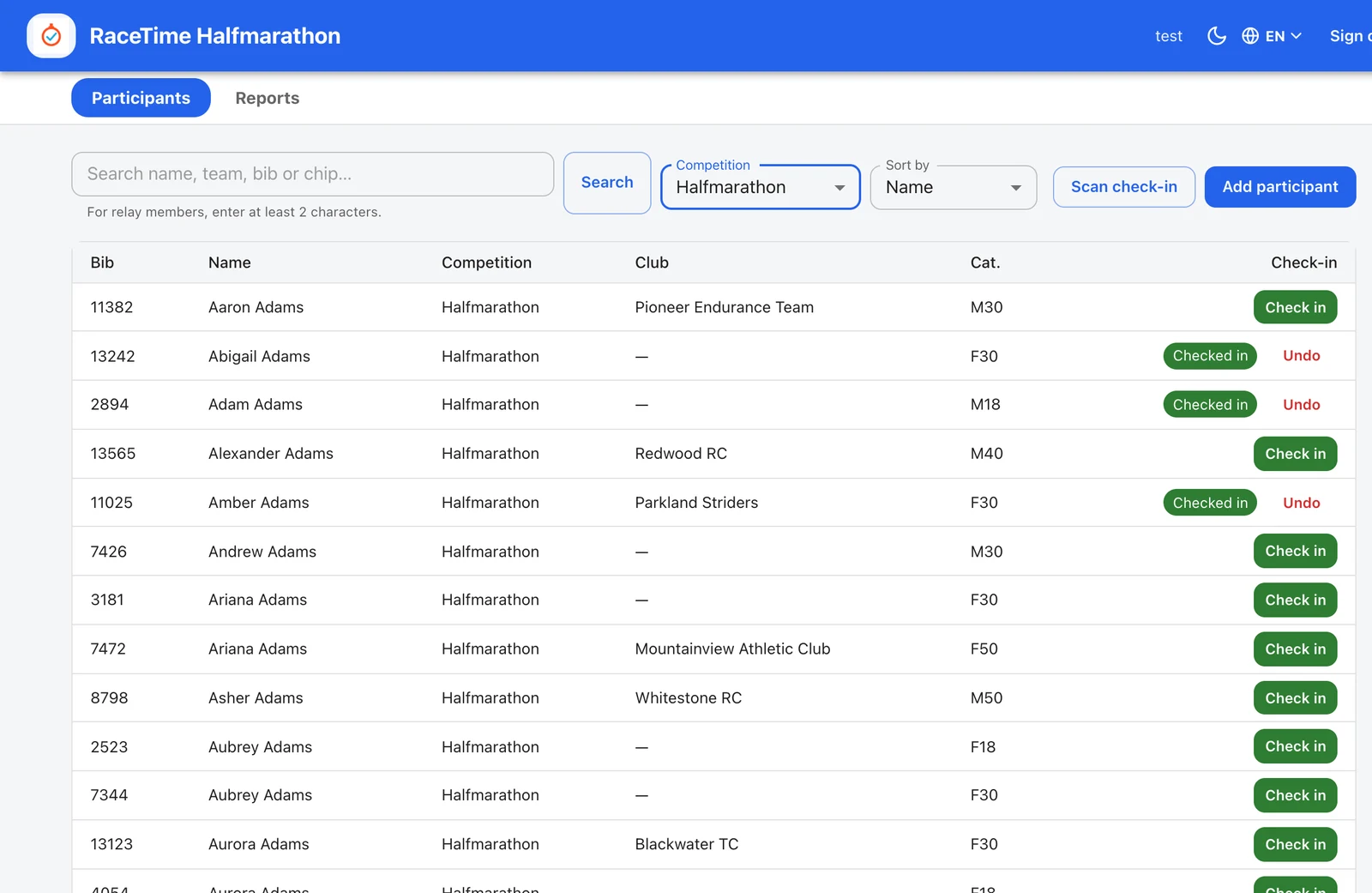
Portal Participants tab - a scoped list with bib, name, competition, club and category, a search box, competition and sort controls and an Add participant button
Search, edit, add. Within their slice of the field, a registrar can search the list, view and edit participants, and add new ones - individuals or relay/team entries. Edits run through the same engine as the admin, so categories and rankings stay correct.
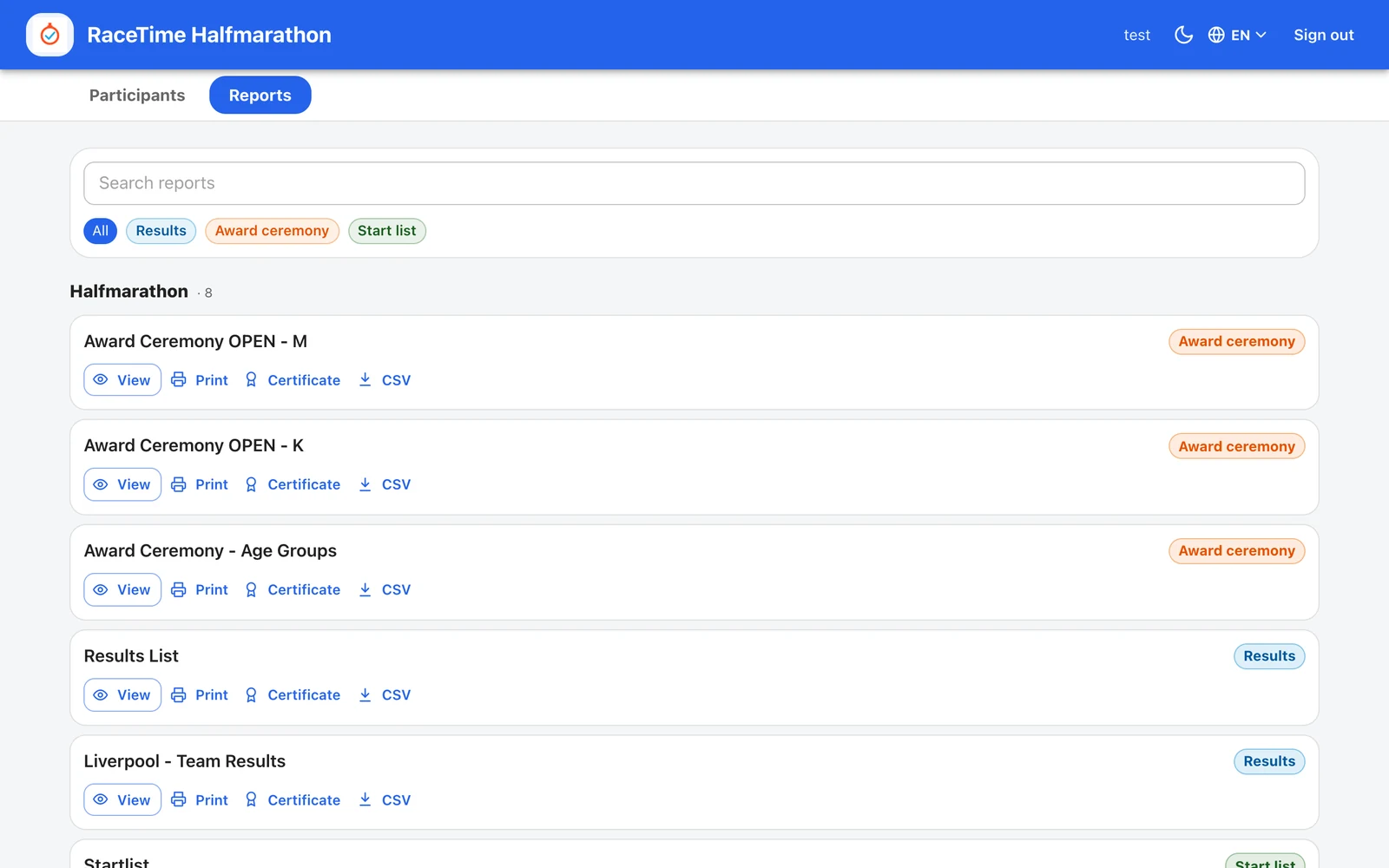
Portal Reports tab - a read-only list of saved reports grouped by competition with View, Print, Certificate and CSV, plus Results, Award ceremony and Start list filter chips
Read-only reports. The event's saved reports, grouped by competition, with view, print, certificate and CSV on each - filtered by results, award ceremony or start list. Nothing here can be edited; it's there to hand the right documents to the right people.
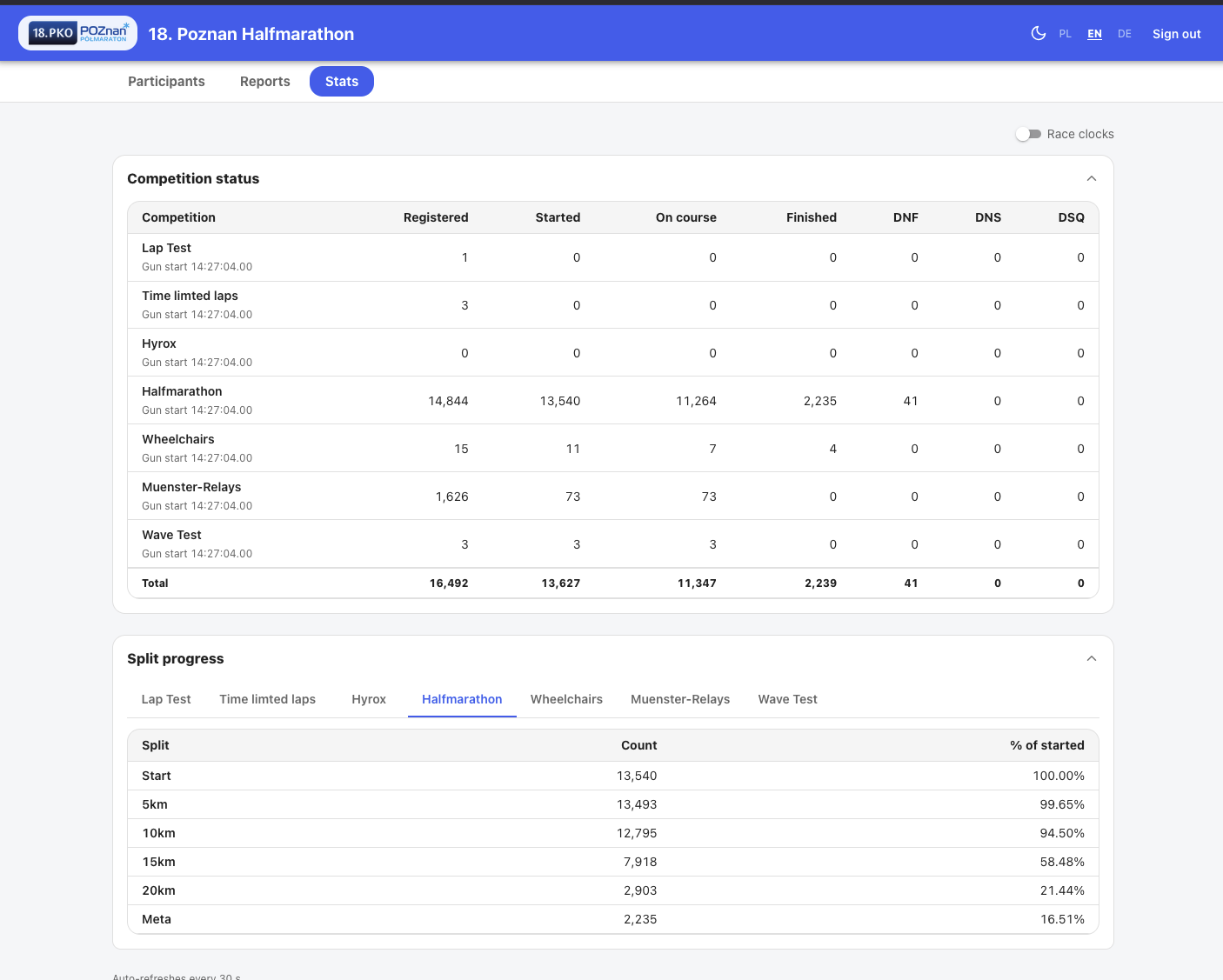
Portal Stats tab - a live Competition status table with Registered, Started, On course, Finished, DNF, DNS and DSQ counts, plus a per-competition Split progress table
Live status, read-only. A live competition status table - registered, started, on course, finished, DNF, DNS, DSQ - and per-competition split progress, so a partner can see how their race is moving without touching a thing.
How a link works

You decide what it can do - and for how long.

Creating access takes a minute. Give the link a label, tick what it can do, optionally restrict it to specific clubs, set how long it lasts, and share it with a generated password.

  • Pick the capabilities - view, edit, add, status, custom fields, reports and stats are each a separate toggle; check-in runs from named kiosks.
  • Restrict to clubs or competitions - limit a link to chosen clubs so a partner only ever works with their own athletes.
  • Themed sign-in - the login screen carries the event's own logo and colours, so it feels like part of the race.
  • Revoke that bites - change what a link can do or revoke it entirely; it takes effect on the very next action.
1 · Label it
Name the link so you remember who it's for - "North club registrar", "Relay partner", and so on.
2 · Tick what it can do
View / edit / add / status, custom fields, reports, stats, check-in - choose any combination.
3 · Scope the clubs
Optionally restrict the link to specific clubs, so it only ever touches those athletes.
4 · Set how long
Choose a password lifetime or a hard expiry date for the link.
5 · Share it
Hand over the link and the generated password, through separate channels. Rotate the password, edit the access, or revoke any time.
Check-in

Two ways to mark athletes present - both built for a phone.

A volunteer can tap down a staffed list, or scan codes at a kiosk station. Either way check-in stays out of the results - it never assigns a timing chip and never touches anyone's time.

racetime.net / check-in / kiosk
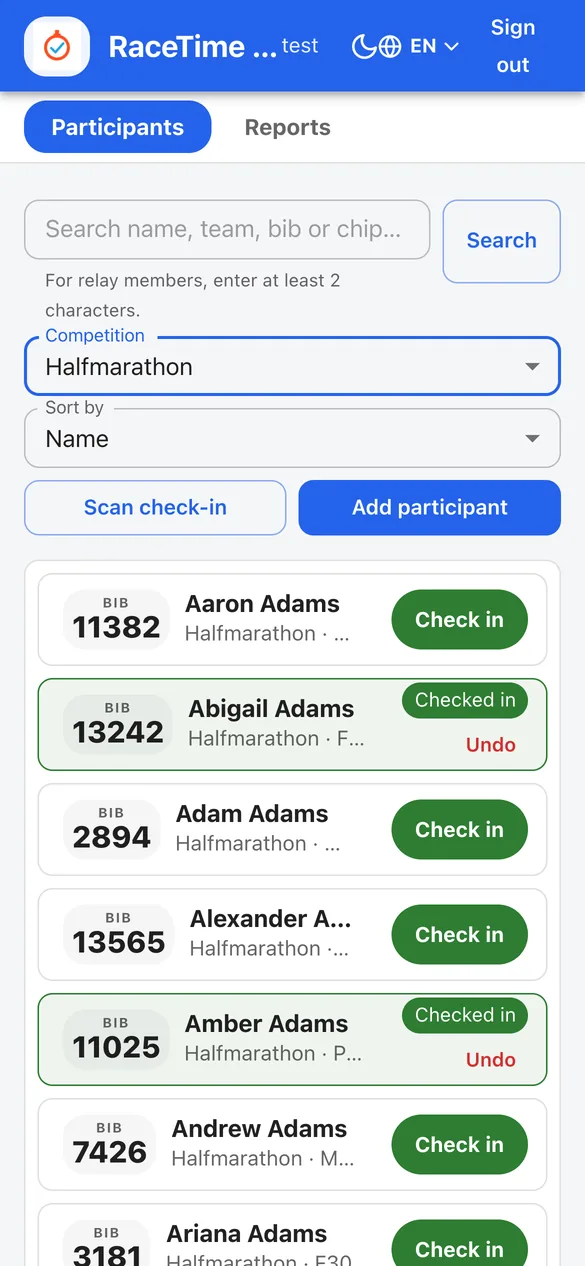
The mobile check-in kiosk - a participant list with big bib badges, a Scan check-in button and Add participant, green Check in buttons, and a checked-in row in a green success state with Checked in and Undo
Staffed or scanned

Tap "Check in", or scan a code.

  • Staffed list - a volunteer finds the athlete and taps "Check in", with a one-tap Undo if they catch the wrong row.
  • QR scan - reads the participant's code; the public-profile QR by default, or a configurable source - bib, chip, or a custom field - set per event or per kiosk.
  • Whole teams at once - scanning any leg's chip checks in the entire relay team in one go.
  • Safe to double-scan - check-in is idempotent, so a second scan keeps the first time. It never assigns a timing chip and never changes a result.
  • Mobile-first - big bib badges and a clear green success state, made for volunteers working off their own phones.
Live arrivals

The organiser's live view of who's actually here.

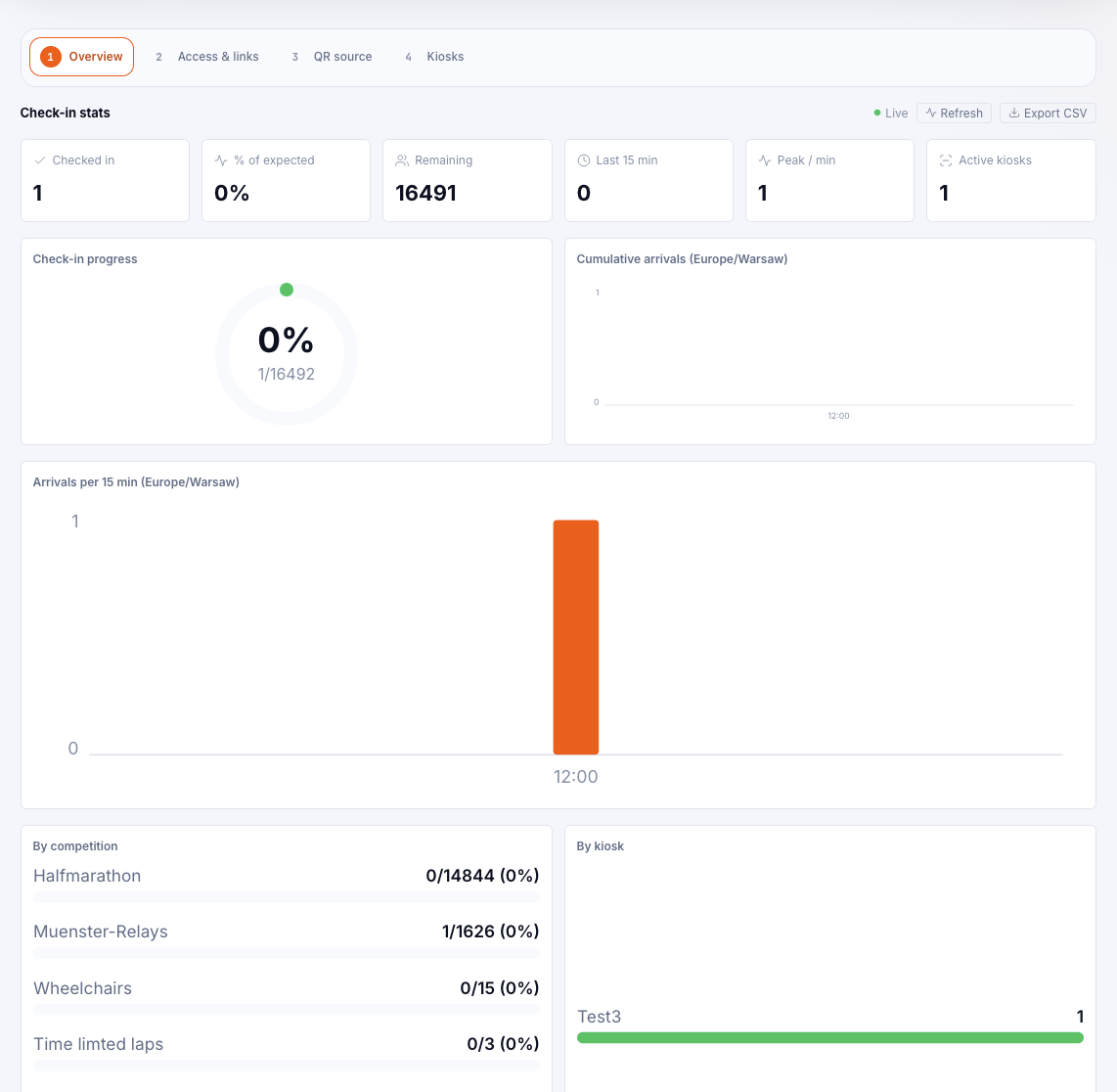
Every check-in flows into one dashboard in the event's own timezone: how many are in, the percentage of expected, how many remain, recent throughput and peak - plus charts of arrivals over time and breakdowns by competition and by kiosk. Export the lot to CSV.

racetime.net / check-in / overview
Onsite App overview - KPI tiles for checked in, percentage of expected, remaining, last 15 minutes, peak per minute and active kiosks, a progress donut, a cumulative-arrivals chart, an arrivals-per-15-min bar chart, and by-competition and by-kiosk breakdowns, with Overview, Access & links, QR source and Kiosks tabs

The numbers, live

Checked in, percentage of expected, remaining, last 15 minutes and peak per minute - with a progress donut, a cumulative-arrivals line and an arrivals-per-15-minute bar chart. Break it down by competition or by kiosk.

A fleet of kiosk stations

Each kiosk is a named station with its own competition scope, a live online/offline status, last-seen time, and a remote sign-out - plus its own optional QR source if one station should read a different code.

Yours to take away

Everything is shown in the event's timezone and exports to CSV - a clean record of who arrived and when, ready for the post-race report.

Also in RaceTime today

More on site.

Want to hand off the busywork at your next race?

It's included in your free trial - full access, with a direct line to the team building it.

Try it free →
Keep reading